List & Label Reporting Blog
New Service Pack 29.003 for List & Label and the Report Server
 By
ByThe latest service pack 29.003 for List & Label brings support for Windows 11 24H2 and an enhanced configuration option for the Web Report Designer to streamline the printing process. Additionally, advanced caching mechanisms have been implemented to reduce server load.
Combining the Report Structure and Object Tool Windows
 By
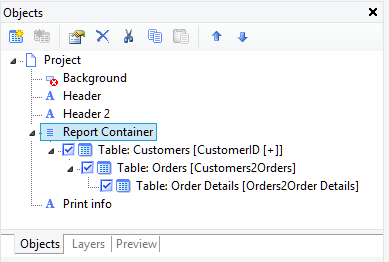
ByThe two tool windows you'll probably use the most in the report designer of our List & Label reporting tool are the "Objects" window and the "Report Structure" window. The "Objects" window enables you to quickly select an object in order to change its properties and contents. The "Report Structure" window is used to configure the specific contents of a report container object, i.e. tables and subtables, charts, crosstabs and Gantt charts.
Filtering at Database Level
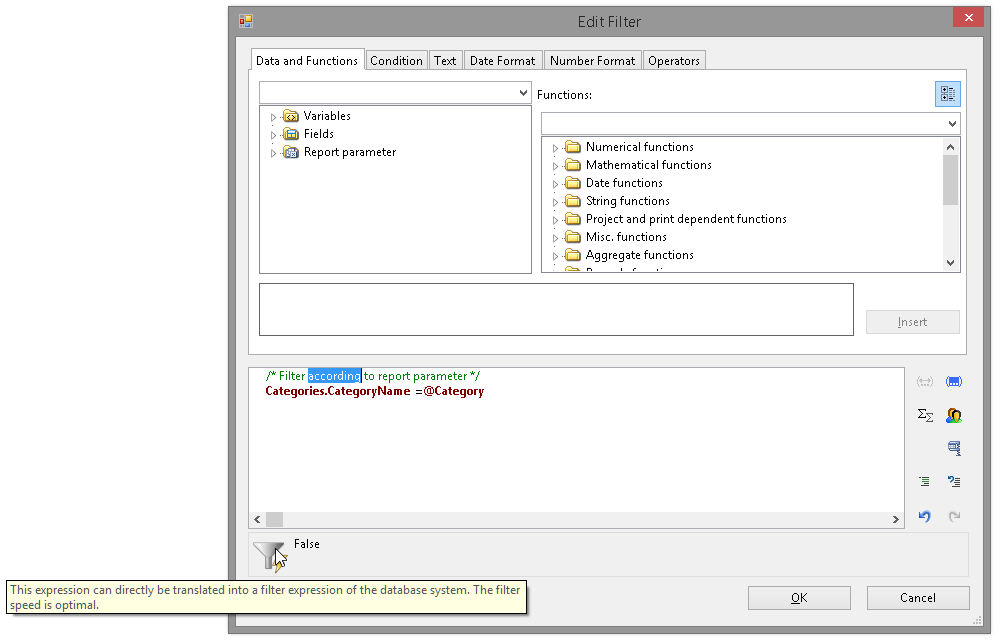
Using report parameters has become very popular since we’ve introduced them in version 19. A typical use case that will become even more seminal with version 20 of our reporting tool is using parameters to filter data (see last feature focus). This is something we’ve usually put on the “don’t” list as databases can filter data much faster than we can. In the past, all records had to be passed to the reporting engine which then decided if a record should be used or not. A vast overhead for a task databases are usually optimized for. In version 20, we’ll be introducing a new feature that allows List & Label filter expressions to be translated to native database filters, therefore hugely increasing performance (in principle, depending on the data this is “infinitely” faster).
Drilldown via Report Parameters
Building on the sound foundation of report parameters introduced in version 19 of our List & Label reporting tool, we've extended the way drilldown reports can be used in the report designer.
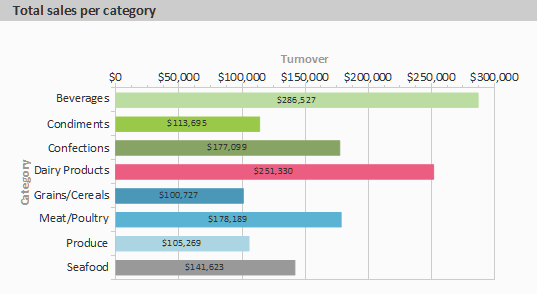
In addition to the drilldown via relations which we already had in the product for a couple of versions, you can now trigger a sub report that uses report parameters and set the parameter values depending on the item that you just clicked in the preview. This terrific feature works for pie/donut and bar charts, shapefile charts, table fields and crosstab contents. Of course, a drilldown report can contain another drilldown, too.
As with all the feature focus articles, keep in mind that this feature is not yet available in the current version, it will be part of List & Label 20.
In addition to the drilldown via relations which we already had in the product for a couple of versions, you can now trigger a sub report that uses report parameters and set the parameter values depending on the item that you just clicked in the preview. This terrific feature works for pie/donut and bar charts, shapefile charts, table fields and crosstab contents. Of course, a drilldown report can contain another drilldown, too.
As with all the feature focus articles, keep in mind that this feature is not yet available in the current version, it will be part of List & Label 20.

What’s this blog for?
In the past, we haven’t been communicating our development progress until the next major version of our development component was almost finished and polished. This is now going to change! Our motivation for this blog is, to show you early what to expect from the next version of our List & Label reporting tool.


